
With Salesforce and MeetingPackage integration you can integrate
- Account/company data --> to Salesforce Accounts
- Contact data --> to Salesforce Contacts
- RFP/Booking data --> to Salesforce Opportunities.
You can search Salesforce based contacts and account data from MeetingPackage user interface while operating in supplier order management.
You can define if you want to create new contacts and accounts to Salesforce from MeetingPackage or does the accounts and contacts required an external ID mapping before connecting to your Salesforce instance.
Order management data (RFPs and Bookings) is connected to Opportunity object in Salesforce. Map your booking statuses with Salesforce opportunity stages.
Custom field mapping is possible.
Currently available fields by default:
| Object in Salesforce | Field name in MeetingPackage | Status |
| Opportunity | Venue name |
one-time push |
| Opportunity | Start date | one-way sync |
| Opportunity | End date | one-way sync |
| Opportunity | Attendees | one-way sync |
| Opportunity | Event name | one-way sync |
| Opportunity | Provisional hold date | one-way sync |
| Opportunity | Lead source | one-way sync |
| Opportunity | Status | one-way sync |
| Opportunity | Blocked room nights | one-time push |
| Opportunity | Booking ID | one-way sync |
| Opportunity | Total value | one-way sync |
| Account | External ID | one-way sync |
| Account | Account name | one-way sync |
| Account | Account contact | one-way sync |
| Account | Agency name | one-way sync |
| Account | Agency contact | one-way sync |
| Other details | Market segment | one-way sync |
| Contact | First name | one-way sync |
| Contact | Last name | one-way sync |
| Contact | one-way sync |
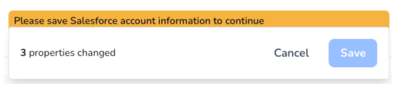
Before you save information in MeetingPackage that is also saved in Salesforce you see this kind of a warning message.
How to connect Salesforce and MeetingPacakge?
Contact your customer success manager to integrate Salesforce to MeetingPackage.