
Update number four of 2026 is a big one. We've been heads down across the whole platform — tightening up the automation, fixing the details that matter, and laying groundwork that makes everything faster and more reliable. From breakfast VAT to multilingual proposals, RFP automation to order management load times, this update touches nearly every corner of MeetingPackage. Grab a coffee, here we go.
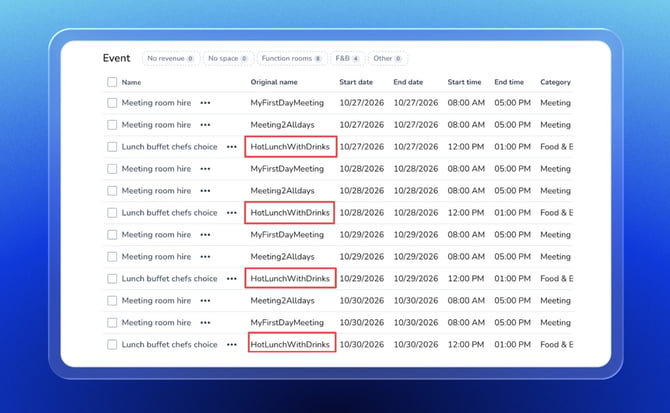
Original RFP item names now appear on all line items
Ever looked at an auto-generated line item in the order management system and thought "what did the client actually ask for here?" — we heard you. When RFP automation runs and creates line items from a client's original request, those items now carry the original name the client used right alongside them. Not just for meeting rooms, but for every line item type across the board.
Previously, original name mapping only worked for meeting room items, leaving F&B, AV, accommodation, and other auto-generated lines without any reference back to what the client originally requested. That meant your team had to mentally connect the dots — or jump back to the original RFP to cross-check. Not anymore.
Now, wherever an auto-created line item exists in the order management system, you'll see exactly what it was mapped from. The client asked for a "Working Lunch for 30 pax"? That name travels with the line item through the entire workflow. Your team gets full context at a glance, proposals are easier to review and validate, and conversations with clients during negotiation become much smoother — because everyone is speaking the same language.
It's a small label, but it does a big job. Less back-and-forth, fewer misunderstandings, and a much clearer paper trail from RFP request to confirmed booking.
Clients can now change the eProposal language themselves
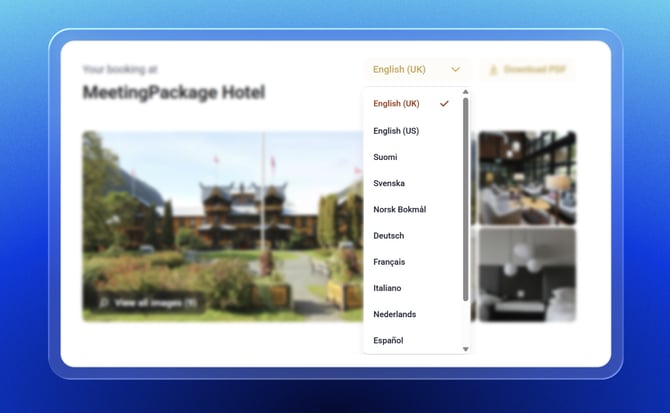
Speaking your client's language just got literal. Customers can now switch the eProposal language directly on the proposal page — right next to the PDF download button — so they can read through the proposal in the language they're most comfortable with, without needing to ask you to resend anything.
And it's not just for clients. Hoteliers previewing the eProposal can now also switch the language to see exactly what the client sees, instead of everything defaulting to English regardless of the venue's language settings. If you've put effort into translating your content, you should actually be able to check it looks right before it lands in a client's inbox.
For international properties and groups operating across multiple markets, this is a meaningful step forward. One proposal, multiple languages, zero friction. No more guessing, no more defaulting, no more lost-in-translation moments.
Other awesome product updates
Confirmation emails now reach your full team
Previously, when a customer confirmed a booking, only one recipient group got the memo. We've fixed that. Both your "Confirmed" and "Customer Should Confirm" recipient groups now receive the confirmation email — so your whole team stays in sync from the moment a booking is locked in. And if someone sits in both groups, we're smart enough not to flood their inbox twice. One confirmation, full coverage.
Bedroom type names can now be hidden in eProposals
Sometimes you just want to keep things simple — or discreet. With the new "Hide bedroom type names in eProposal" setting, you can now present all same-day accommodation as a single tidy "Run of House" line, rather than listing every room type individually. Quantities and prices are automatically summed up, so the numbers still add up perfectly — your clients just won't know if it's a Deluxe King or a Standard Twin. Discretion, delivered.
Read more about eProposal settings →
Breakfast and room VAT are now split automatically
Breakfast and bed no longer share a VAT rate — and your finance team is relieved. For MEWS-connected venues, MeetingPackage now automatically splits the breakfast VAT from the room rate. You'll see each VAT amount clearly in the order management system and on the eProposal. No more manual math, no more awkward explanations to clients. The numbers do the talking.
Read more about VAT settings →
Rooming list reservation settings now follow your integration config
Your rooming list now plays nicely with your PMS. The individual reservation toggle is now controlled by your venue's integration configuration — meaning it automatically reflects the right setting without anyone needing to fiddle with it manually. Less guesswork, more consistency.
Read more about Rooming list →
Custom seating order data is now stored on line items
Custom seating orders now have a memory. We've updated order management system original line items to store custom seating order data — so those specific setup configurations your clients care about don't vanish into the void. What goes in, stays in.
Read more about Custom seating orders →
The order management system loads significantly faster
Your order management system just hit the gym. We've overhauled how the booking overview page loads — instead of staring at a blank screen while everything queues up in the background, you'll now see the page structure immediately with smart loading sections filling in as data arrives. Your mornings just got a little less painful.
Provisional hold date is now a filter and download field
Provisional holds now have their moment in the filter spotlight. You can now filter bookings by their provisional hold date — and it's included in your download export too. No more manual scanning to find which holds are about to expire. Your pipeline just got a lot more manageable.
Read more about Downloading booking data →
Guest phone numbers are now included in booking downloads
Phone numbers have joined the booking download party. You can now include guest phone numbers in your booking export. One less system to check when you need to reach a booker quickly. Simple, but we know you've been waiting for it.
Read more about Downloading booking data →
Event Temple booking IDs are now fully searchable
Event Temple booking IDs are now fully searchable. If your bookings use the BK-123456 format, you can now search by just the number — or the full ID — and MeetingPackage will find them. No more coming up empty-handed when looking up a booking from another system.
Multi-day meetings are now assigned the same room automatically
Multi-day meetings now stay in the same room. RFP automation is smarter about space consistency — if a meeting uses the same hours across multiple days and the room is available, automation will book the same room for the whole run. No more bouncing between different spaces day to day. Continuity, delivered automatically.
Read more about RFP automation →
Auto-created line items are now linked to their original RFP request
Every line item created by RFP automation is now linked back to the original RFP item it came from. You can see exactly which client request generated which booking line — making it easy to verify, audit, and explain. Transparency meets automation.
Read more about RFP automation →
The printed RFP now includes all key decision-making fields
The printed RFP grew up. It now includes the fields your sales and revenue teams actually need: Organisation Type, Commission, Dates Flexible, Contract Signature Location, and Alternative Dates. No more hunting through the system mid-meeting — everything you need to make a decision is right there on the page.
Read more about RFP automation →
eProposal status updates are now instant and reliable
When a client takes action on an eProposal, the booking status change now happens immediately and reliably — no more delays from background processing queues. No more "why is this still showing as pending?" moments. Real-time, every time.
Platform reliability and observability improvements
Not every update comes with a shiny new button — but the ones that keep everything running smoothly are just as important. We've migrated several key API endpoints to our core infrastructure, making them faster and more resilient. We've also added error monitoring to eProposal, so when something goes wrong, our team knows about it immediately — often before you do. Less downtime, faster fixes, happier hoteliers.
That's a wrap — and there's plenty more to come
Another sprint, another stack of improvements making their way to your properties.
As always, most of these updates happen automatically — no action needed on your end. Where there are new settings to explore, you'll find them exactly where you'd expect them. And if anything looks unfamiliar or you have questions, our support team is always just a message away.
Thanks for being part of the MeetingPackage community. We build this for you — and your feedback is what keeps us moving in the right direction. Until next time.
P.S. Not a MeetingPackage customer yet? Start a Free Trial or Contact Sales