
RFP Automation allows you to automatically fill in proposal to save time and increase efficiency for faster replies to incoming RFPs. Any incoming unstrcutured RFP (meaning for example that certain room, or layout is not mentioned in the RFP) will be autogenerated by click of a button called "Auto create" to pull meeting room, Food & Beverage items, and bedrooms requesed in the original RFP. The Auto create function checks the availability, pricing and suitabiliti of the service to the RFP and prefills the proposal for the venue users.
After the prefilled proposal you can check the details before sending eProposal back to the customer. You can also see the original request to compare the prefilled values against the original values.
How is the proposal automatically filled in?
RFP automation builds booking line items from the incoming RFP by mapping agenda items (meeting + F&B + E&M) and guest room requests to the venue’s catalog and availability, using exact or fuzzy matching, then filling in space, layout, quantity, and price where possible.
Logic (high level)
1. Find a catalog item for each RFP agenda item (mainly F&B and E&M)
- Compare agenda item details against the venue’s catalog items.
- Try exact match, then fuzzy match (typos, small differences).
- If nothing matches, pick the cheapest catalog item.
2. Assign a space to the line item (when applicable)
- Uses agenda item date and attendee count.
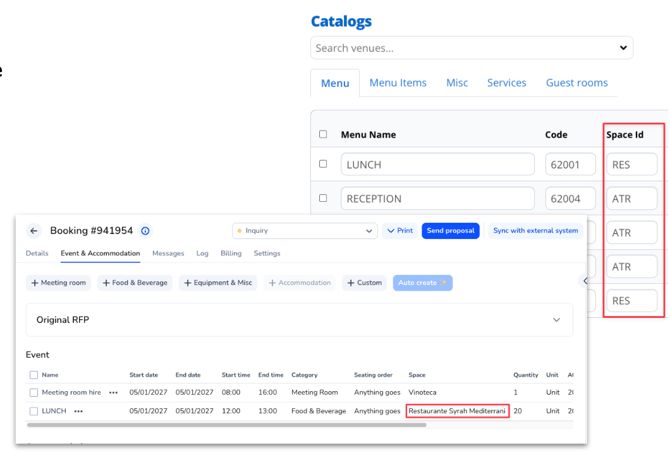
- If the catalog item already has a space filled in (free text), it fuzzy-matches that to an actual space for the date.
- Otherwise, it selects a space by attendee count and date, and may leave space blank if none are found.
3. Meeting room agenda items (rooms created from the agenda)
- Uses agenda date-time range + attendee count to find a suitable room that is online/free in PMS calendar.
- Picks the smallest room that fits the capacity. If none, leaves space blank.
- Price: uses the room’s full-day price for that date, any other case set the price 0.00.
- Layout: reads the RFP’s preferred seating order, fuzzy-matches to room layouts, else falls back to “Anything goes”.
4. Guest rooms (accommodations)
- Creates accommodation line items based on RFP room types and occupancy per type.
- If venue has custom bedrooms, match by type first, then by occupancy (bedroom occupancy >= requested). Merge duplicates.
- If using MeetingPackage room types, similar matching, but rates come from MeetingPackage room type pricing; quantities are used as-is for those types.
What “line item information” it pulls / uses from the RFP
From the RFP, it primarily uses:
- Agenda item name (used for matching, split into logical words)
- Meal selection (if present, used for matching)
- Agenda item type (fallback matching, e.g., “Lunch”)
- Agenda item date / date-time range
- Attendee amount (used for space/room selection, and F&B quantity logic)
- Preferred seating order (for meeting room layout and improved room selection)
- Guest room types and occupancy (for accommodation line items)
- Equipment & misc quantities (E&M uses quantity from the RFP; F&B uses attendees).
What it fills in on created line items (derived outputs)
It will attempt to populate:
- Selected catalog item (or cheapest fallback)
- Assigned space/room (or blank if none found)
- Layout/seating (or “Anything goes” fallback)
- Price (meeting rooms: full-day price or 0.00; accommodations: depends on whether MP room types have rates; custom bedrooms do not have pre-defined rates)
- Quantity (E&M from RFP quantity; F&B based on attendee count)
💡 NOTE: RFP automation matches space IDs between spaces and catalog items' preselected spaces, ensuring the correct spaces are selected automatically.
How to get it?
This feature is on a request basis and works with unstructured booking channels such as Cvent or your email inbox. Contact your customer success manager to enable this feature.
Conclusion
RFP Automation automatically standardize and map RFPs from any channel into PMS and S&C -ready bookings, eliminating manual data entry and enabling faster, more accurate responses that protect both time and revenue.