
Another sprint, another stack of upgrades. This time around eProposals got a five-star wardrobe change, multi-venue admin got a lot less copy-paste, and a handful of smaller conveniences quietly made everyone's day easier. Grab a coffee — here's everything that shipped, and why it's worth your attention.
Here's what we have improved
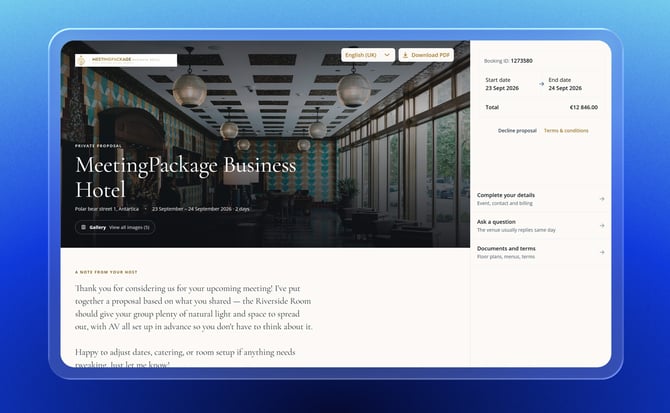
eProposal — Luxury template
New "Luxury (5-star)" eProposal template
A new luxury-styled eProposal template is now available, selectable per brand style under Organisations → Brand Style, with a configurable section order. Existing brand styles stay on the Standard template — nothing changes unless you opt in.
Why you'll love it:
- A polished, five-star-hotel look for proposals without any custom design work
- Section order is configurable per brand, so you can match how each property likes to present itself
- Fully opt-in — zero impact on properties that don't switch
Venue film + 360° tour in the Luxury hero
The Luxury eProposal hero section now plays the venue's own YouTube film behind it, and shows a 360° tour chip beside the gallery chip whenever the venue has one on file.
Why you'll love it:
- Proposals open with motion and immersion instead of a static photo
- No extra setup — it surfaces content you've already uploaded
Venue & organisation management
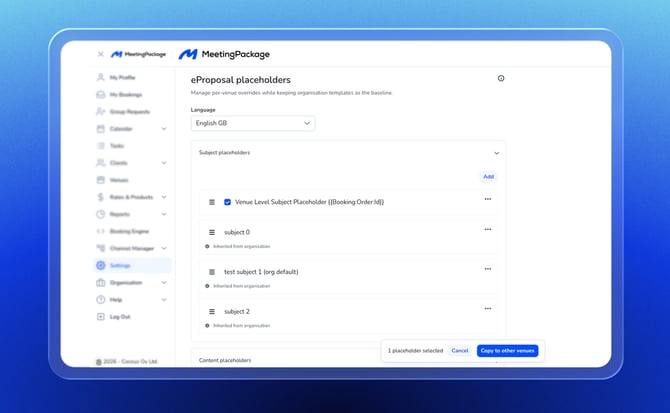
Copy eProposal placeholders across all venues in an org
Venue eProposal placeholders can now be copied across every venue in an organisation in one action, instead of re-entering them venue by venue.
Why you'll love it:
- Saves real setup time for multi-property organisations
- Keeps proposal placeholders consistent across a brand's venues
Venue rights management under Organisation / Users
Venue-level rights can now be managed directly from Organisation → Users, giving admins a single place to control who has access to which venues.
Why you'll love it:
- Clearer, more centralized user permissioning for multi-venue organisations
- Fewer support tickets for access changes
Booking Engine
Instant-bookable badge on the rate
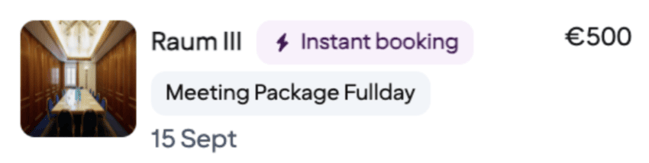
The instant-bookable badge now shows directly on the rate rather than the whole room card, and is live for everyone (the feature flag has been removed).
Why you'll love it:
- Shoppers see instant-bookability exactly where the price is, reducing confusion
- No configuration needed — it's on by default now
Branded booking-verification emails
Booking verification emails (login and booking confirmation tokens) now follow the venue's brand styling instead of a generic template.
Why you'll love it:
- A consistent, on-brand experience from search through confirmation
Integrations
Automatic "Actualized" status for OSEM bookings
OSEM bookings now automatically move from Confirmed to Actualized seven days after departure, once bedroom reconciliation succeeds — no manual status update required.
Why you'll love it:
- One less manual housekeeping step for OSEM-connected venues
- Keeps booking status accurate for downstream reporting
Configurable Cvent cancel emails
Cvent customer cancellation emails can now be enabled or disabled per organisation, rather than being all-or-nothing. Ask your Customer Support Manager to enable this feature for you.
That's the roundup — proof we've been busier than a front desk on a Friday afternoon. Got a question about anything here, or want to see it in action? Your MeetingPackage contact is one message away — and we'll be back next sprint with more.
P.S. Not a MeetingPackage customer yet? → Contact Sales