
Across eProposal, the order management system, RFP automation, and integrations, the team has been shipping at pace — and it shows. Proposals are smarter and more accurate, the order management system loads faster and works harder, automation now reaches further into your booking flows, and a pile of long-standing bugs have been quietly put to rest. Whether you're running a single property or a large portfolio, something in here will make your day a little smoother. Let's get into it.
Room Occupancy
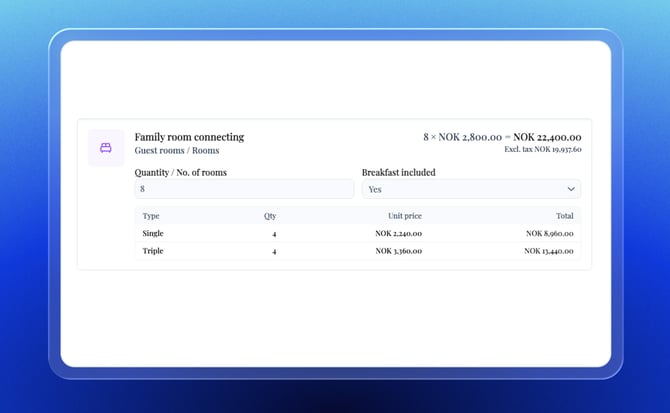
You can now track room occupancy — single, double, triple, and quad — directly in the order management system. The occupancy room grid is a configurable view that shows agreed, blocked, and actualized quantities and prices per occupancy level for each accommodation line item. Enable it at the organization level under booking configuration.
The same occupancy data surfaces in eProposal as a tooltip breakdown under the quantity and price fields — so your clients can see the occupancy-level detail behind the numbers if they want it.
Occupancy Levels in eProposal
Occupancy level breakdowns — single, double, triple, quad — now appear in eProposal as a tooltip under the quantity and price fields for accommodation line items. Clients can see the detail behind the numbers if they want it, without it cluttering the main proposal view. Works alongside the occupancy room grid in the order management system (see above).
 Selecting multiple items in search
Meeting Room Selection
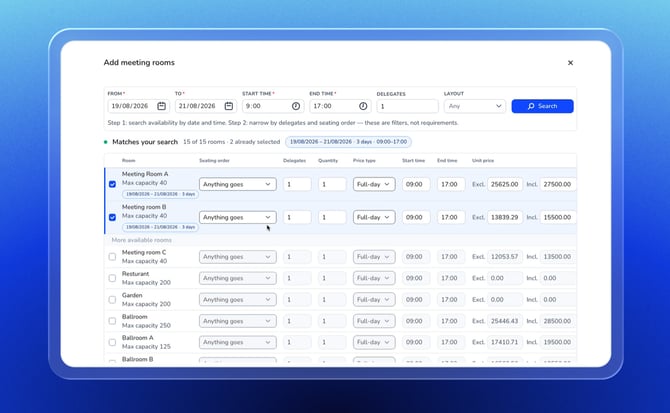
There's a new meeting room search view in the order management system that lets you search, configure, and add multiple meeting rooms to a booking in one go. Each room appears as a configurable line item — space, layout, delegates (pre-filled from your search), pricing options, time, and unit price. As you select rooms, they move to the top of the list, with remaining available rooms below. The footer shows a summary of configured rooms and total revenue, along with save options.
For complex group bookings with multiple breakout spaces, this dramatically reduces the time required to configure everything.
F&B and Misc Items
The same multi-select experience that landed for meeting rooms is now available for food & beverage and miscellaneous items. Open the search drawer, filter by date, time, and keyword, select the items you want, and they're added with attendees and timing pre-filled from your search. If external product syncing is off, you can set prices on the pre-selected items directly in the list.
Additional Views in the Order Management System
The event and accommodation tabs now have five new view options alongside the existing full list: Grouped, By Day, Timeline, By Category, and By Space. All new views are read-only — they're for reviewing and navigating, not editing. The timeline view shows item names and prices. The by-category view uses calendar dates rather than "Day 1, Day 2" labels. The full list remains the editing view and is unchanged.

Switch views using the controls at the top of the tab.
Bulk Discount Editing
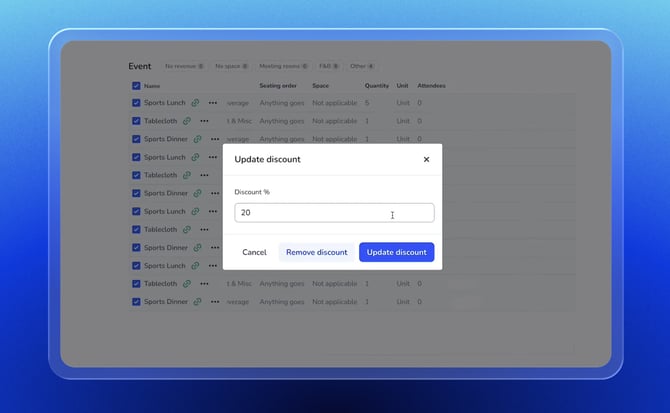
You can now apply and edit discounts across multiple line items in the order management system at once. Previously, discounts had to be set item by item. The new bulk add and bulk edit actions let you select multiple items and update their discounts in a single step. Useful when a negotiated group rate applies across a large number of line items.
Package Items Copy Across All Event Days
When you add a package to a multi-day booking, it now automatically copies to all days in the range — matching how meeting room, food & beverage, and miscellaneous items already behave. The availability check also covers the full day range, not just the first day. Add once, done for the whole event.
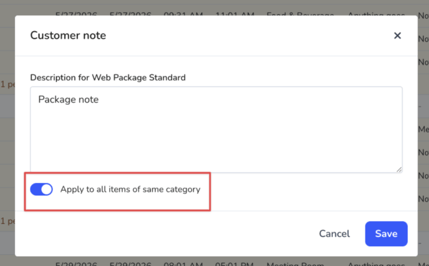
Apply Customer Notes to All Same-Category Items
If you add a customer note to an event line item and want the same note applied to other items in the same category, you can now copy it across in one action. This mirrors the existing copy behavior for accommodation notes. Useful when a special requirement — a dietary note, a setup instruction — applies to multiple items in the same category.
Workflow Default Value Improvements
Workflows now support field-level defaults, giving you finer control over how booking fields are auto-populated. Now you can set a default value on a specific field within a workflow — so, for example, one market segment field comes from the workflow rule while another is pulled from the account's market segment. Both values coexist without conflict.
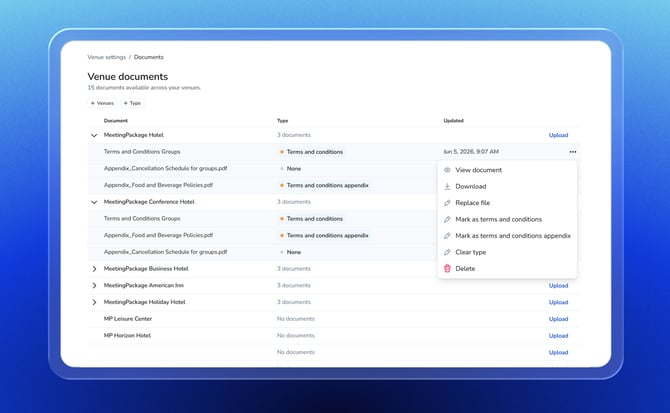
Venue Documents Management Page
There's now a dedicated page for managing venue documents across your organization. You can list all venues, manage the documents attached to each, and mark one as the default terms & conditions. Additional documents can be designated as appendices to the main T&C. Full create, read, update, and delete for each venue's document library. Useful for keeping accurate, venue-specific legal documents in one place rather than scattered across settings.
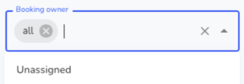
Filter Bookings with No Assigned Owner
A new "Unassigned" option in the booking owner filter lets you find all bookings without an owner yet. Previously, the "All" filter excluded bookings with an empty owner field, making them essentially invisible when filtering. Now you can surface them deliberately and make sure nothing is slipping through unattended.
RFP Automation updates
RFP automation now works for bookings that come in via the Group Lead Page (GLP) channel. Previously, the system wasn't tracking the booking source correctly for GLP, which meant the automation trigger never fired. That's fixed — GLP bookings now get the same auto-creation of line items as other RFP channels.
Also we extended RFP automation support to the group event booking page. Bookings arriving via this channel now trigger auto-creation in the same way as other RFP sources. The source is tracked correctly across the frontend, backend, and the booking record.
Customer Emails Suppressed for Demand Channel Bookings
Bookings arriving via demand channels — Eventlogic, Venuedirectory, and Kactus — no longer trigger customer-facing emails from MeetingPackage. The suppressed emails include hold date reminders, confirmation notices, hold date update notifications, and group booking requests. These channels handle their own customer communication, so MeetingPackage sending additional emails was creating duplicates and confusion. The emails are now suppressed at the source for bookings from these channels.
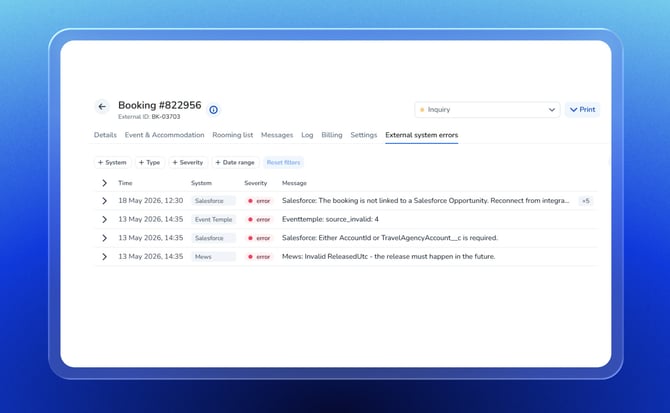
Integration Error Logs in the Order Management System
When an integration sync fails in the order management system, you now see a clearer, more informative error message rather than a generic failure state. The improved error logs help hotel staff understand what went wrong — and in many cases, take action themselves without needing to file a support ticket.
That's a wrap — and there's plenty more on the way
A wide-ranging update, and it's just the beginning of what's in the pipeline. As always, the vast majority of these changes land automatically — no action needed on your end. Where new settings have been added, you'll find them exactly where you'd expect: in the order management system, under your venue configuration, or at booking level. If anything looks different or you have questions, our support team is always a message away. Thanks for building with us — your feedback shapes every sprint. Until next time.
P.S. Not a MeetingPackage customer yet? Start a Free Trial or Contact Sales