
AI Email Agent
The AI Email Agent reads inbound Request for Proposal (RFP) emails sent to your property, extracts key event details (dates, guest count, rooms, F&B, and more), and submits a complete, structured RFP into MeetingPackage on your behalf. Emails that are not RFPs — such as general inquiries or marketing messages — are forwarded to your fallback email for manual handling.
Why use it? Event sales teams typically spend 30–60 minutes per RFP email manually extracting details and re-entering them into a booking system. The AI Email Agent reduces this to seconds.
How It Works
Each property receives a unique agent email address (e.g., bookings@yourhotel.commerce.meetingpackage.com). When a customer or booker sends an RFP to this address, the AI pipeline processes it automatically:
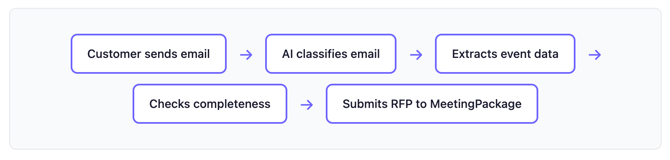
If the email is missing critical details (such as dates or guest count), the AI sends a follow-up email to the customer to collect the missing information before creating the RFP.
What the AI Extracts
The AI reads the email and extracts the following event details where available:
| Field | Description | Example |
|---|---|---|
| Event dates | Check-in and check-out dates | 15 May – 17 May 2026 |
| Guest count | Number of attendees | 80 |
| Event type | Meeting, conference, wedding, etc. | Conference |
| Hotel rooms | Overnight accommodation needed | 40 double rooms |
| Meeting rooms | Number and type of event spaces | 1 ballroom |
| Food & beverage | Catering requirements | Coffee breaks, lunch, dinner |
| Budget | Total or per-person budget | €15,000 total |
| Contact details | Name, company, email | Jane Doe, Acme Corp |
| Special requirements | AV, seating style, amenities | Sauna, terrace access |
Date format: The AI understands European date format (day.month), so "15.5" is interpreted as May 15th. Dates in the past are automatically moved to the next year.
Email Classification
The first thing the AI does is determine whether the email is an RFP (event booking request) or a general inquiry (questions about policies, directions, amenities, complaints, etc.).
- RFP emails enter the extraction and qualification pipeline, and are ultimately submitted to MeetingPackage as structured booking requests.
- General inquiries are forwarded directly to your configured fallback email address for manual handling by your team.
RFPs are further classified by event type — meeting (events with meeting spaces) or accommodation (room-only bookings without event spaces) — which determines how the AI handles meeting room requirements in the downstream process.
4 Intelligent Follow-ups
When the AI has enough information to identify an RFP but some details are missing, it sends a single follow-up email to the customer asking for the missing information. The follow-up email:
- Is written in the customer's language (auto-detected from their email).
- Uses the tone preset configured for your property (formal, luxury, social, or corporate).
- Only asks about information that was not already provided — it never repeats questions.
- References your property's actual space names when relevant.
- Adapts its questions to the event type (for example, asking about AV requirements for corporate events or venue preferences for social events).
When the customer replies, the AI extracts only the new information, merges it with what was already collected, and re-evaluates whether all required fields are now complete. If so, the RFP is created.
5 Automated Reminders
If a customer does not respond to a follow-up, the system schedules automatic reminder emails:
| Setting | Default | Configurable? |
|---|---|---|
| Delay before first reminder | 3 days | Yes |
| Interval between reminders | 3 days | Yes |
| Maximum number of reminders | 2 | Yes |
| After max reminders | Escalate to your team | — |
Reminders are short, friendly nudges written in the customer's language. Once the customer replies and the RFP is successfully created, all pending reminders for that conversation are automatically cancelled.
If the customer still hasn't responded after the maximum number of reminders, the conversation is escalated — it gets forwarded to your fallback email for human follow-up.
6 Confirmation Emails
When all required details have been collected and the RFP is submitted to MeetingPackage, the customer receives an automatic confirmation email. This email:
- Thanks the customer for their event request.
- Confirms the request is registered with a MeetingPackage reference number (Order ID).
- Lets the customer know the venue's events team is reviewing their request.
- Informs them that replies to the thread will be added to their request.
7 Forwarded Emails
Hotel staff can forward customer inquiry emails to the AI agent address instead of having the customer email it directly. The system automatically detects forwarded emails (including Fwd:, FW:, WG:, TR:, and VL: prefixes across multiple languages), extracts the original sender's details, and processes the email as if the customer had sent it directly.
All follow-up communication (qualification emails, confirmations, reminders) is sent to the original customer, not to the hotel staff member who forwarded the email.
8 Venue Intelligence
The AI Email Agent includes built-in venue intelligence that evaluates whether your property can fulfill an incoming request:
- Capacity check: If the requested guest count exceeds your largest room's maximum capacity, the system detects this as a gap.
- Requirement matching: Special requirements (e.g., sauna, terrace, pool) are matched against your property's actual configured amenities and spaces.
- Sister property suggestions: If your property cannot fulfill a specific requirement but another property in your workspace can, the AI will honestly communicate this to the customer and suggest the alternative property by name.
For chain-level and custom agents managing multiple properties, the system scores and ranks candidate properties based on capacity, location, room availability, meeting spaces, and F&B suitability, and recommends the best-fitting venues in the follow-up email.
9 Priority Escalation Rules
You can configure threshold-based escalation rules to be alerted when high-value RFPs come in. When an incoming RFP exceeds your configured thresholds, an escalation notification email is sent to your designated recipients so your sales team can prioritize it.
Escalation rules can be set based on estimated revenue, total room nights, number of rooms, meeting rooms, length of stay, guest count, event duration, and more. Each rule carries a severity score, and the system sends notifications when the combined score passes your threshold.
Three escalation modes are available:
| Mode | What happens |
|---|---|
| Notify only | Sends an alert email. AI continues processing normally. No visible change in the UI. |
| Notify and continue | Sends an alert email and shows an escalation badge in the admin UI. AI continues processing. |
| Notify and takeover | Sends an alert, shows a badge, and hands the conversation over to your team after the customer confirms. Future replies go to your fallback email. |
10 Configuration Options
The AI Email Agent can be configured per property. The following settings are available:
| Setting | Description | Default |
|---|---|---|
| Required Fields | Choose which optional fields the AI must collect before creating an RFP | All optional fields off |
| Tone Preset | Communication style: formal, luxury, social, or corporate | Formal |
| Custom Instructions | Free-text brand guidelines injected into the AI's responses | Empty |
| Response Language | Auto-detect from email or force a specific language | Auto |
| Max Follow-ups | How many qualification emails before escalating | 2 |
| Max Reminders | How many reminder nudges for unresponsive customers | 2 |
| Reminder Delay | Days before the first reminder is sent | 3 days |
| Reminder Interval | Days between subsequent reminders | 3 days |
| Signature Block | Custom signature appended to all outbound AI emails | Empty |
| Fallback Email | Email address for escalations and general inquiries | Required |
Important: A fallback email address is required. This is where general inquiries and escalated conversations are forwarded for human handling.
11 Human Takeover
At any point, an admin can manually set a conversation to human takeover mode. Once activated, all subsequent inbound messages on that thread are forwarded directly to your fallback email without any AI processing. This gives your team full control when needed.
12 Conversation Threading
All emails related to the same request are automatically grouped into a single conversation thread based on the email subject line. The system recognizes reply and forward prefixes in multiple languages (Re:, Fwd:, VS:, SV:, etc.) and strips quoted replies to focus only on new content in each message.
How to get it
The AI Email Agent is available on a request basis. Contact your Customer Success Manager to enable this feature for your property. Once activated, you will receive your unique agent email address and can start configuring the settings described above.
Conclusion
The AI Email Agent eliminates manual data entry from your RFP workflow by automatically reading, classifying, and extracting event details from inbound emails. With intelligent follow-ups, automated reminders, venue intelligence, and priority escalation, your team can respond faster and focus on winning business rather than copying and pasting event details.